Best Drum Machines for Beginners

I’ve been playing drums for over 20 years. The first time I sat in front of a drum machine I made something that sounded like a washing machine falling down a staircase, then I figured out the sequencer and didn’t put it down for three hours.

I’ve spent time with all five machines on this list and I’ll give you the honest picture of what each one is actually like to use, including the limitations that will frustrate you if you don’t know about them going in. 


Short on time? The Native Instruments Maschine MK3 is the best overall drum machine for beginners who want to get serious. Deepest sound library, best pads, built-in audio interface, and it grows with you.

My Picks for the
Best Drum Machines for Beginners

Quick Recommendations
Jump to What You Need
5 picks · every budget · personally tested by Brett Clur
Image Our Pick Use Case Buy
Native Instruments Maschine MK3
01 / 05
NI Maschine MK3
Top Pick
Best For
Best Overall
Roland TR-8S Rhythm Performer
02 / 05
Roland TR-8S
Best For
Best for Live Performance
Arturia DrumBrute Analog Drum Machine
03 / 05
Arturia DrumBrute
Best For
Best Analog Sound
Korg Volca Beats Analog Drum Machine
04 / 05
Korg Volca Beats
Best For
Best Budget Analog
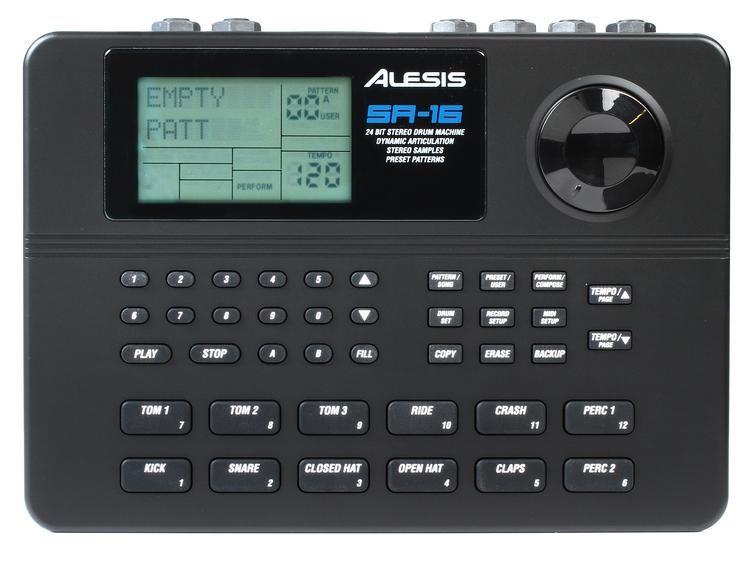
Alesis SR-16 Portable Electronic Drum Machine
05 / 05
Alesis SR-16
Best For
Best for Practice

FEATURED ON

FEATURED ON

The 5 Best Drum Machines for Beginners

1. Native Instruments Maschine MK3

Best Overall
Native Instruments Maschine MK3
Native Instruments
Maschine MK3
4.8
#1 Best Overall
Dual color screens. Built-in audio interface. Over 8GB of sounds out of the box. The Maschine MK3 is the drum machine that grows with you — beginner-friendly on day one, deep enough to still be discovering new features years later.
Score Breakdown
9.3 / 10
Ease of Use
8/10
Layout is intuitive and the tutorials get you making beats fast. Expect a real learning curve as you go deeper — this is a production ecosystem, not a simple drum machine.
Sound Library
10/10
8GB+ of content straight out of the box — 100+ kits, 700+ drum sounds, 144 Kontakt instruments, and synth presets from Massive, Monark, and Prism. Nothing on this list comes close.
Pad Feel
10/10
Oversized, velocity-sensitive pads with aftertouch. The most expressive and consistent pads at this price point — finger drumming on these feels genuinely musical.
Build Quality
9/10
All-metal construction. Touch-sensitive knobs, firm clicky buttons, and dual color screens. Some units report knob sensitivity issues after heavy use — keep them dust-free.
DAW Integration
10/10
Works standalone, as a VST/AU/AAX plug-in, and as a full DAW controller. Deep integration with Logic, Ableton, FL Studio, and Pro Tools with zero compatibility headaches.
Portability
7/10
At 4.85 lbs it travels well, but requires a computer to run. Not a laptop-free solution — plan for a full studio setup or laptop rig every time you use it.
Value
9/10
Premium price justified by built-in audio interface, dual screens, and a sound library that would cost significantly more if purchased separately. The most complete package on this list.
Beginner Friendly
9/10
Dedicated mode buttons, color-coded pads, and built-in tutorials flatten the initial learning curve. Multiple Sweetwater owners report making real beats within the first session.
What's included / key specs
16 Velocity-Sensitive Pads Aftertouch Support Dual Color LCD Screens Built-in 24-bit/96kHz Audio Interface 8GB+ Sound Library Komplete 15 Select Included Smart Touch Strip VST / AU / AAX / Standalone USB Bus-Powered Standalone (No Computer) Mode Tilt Legs
Native Instruments Maschine MK3

The Maschine MK3 is the drum machine I recommend most often to drummers getting into production for the first time, because it’s the only machine on this list that won’t limit you as you improve.

For a deeper look at the hardware itself, we have a dedicated Native Instruments Maschine MK3 review that goes into more detail.

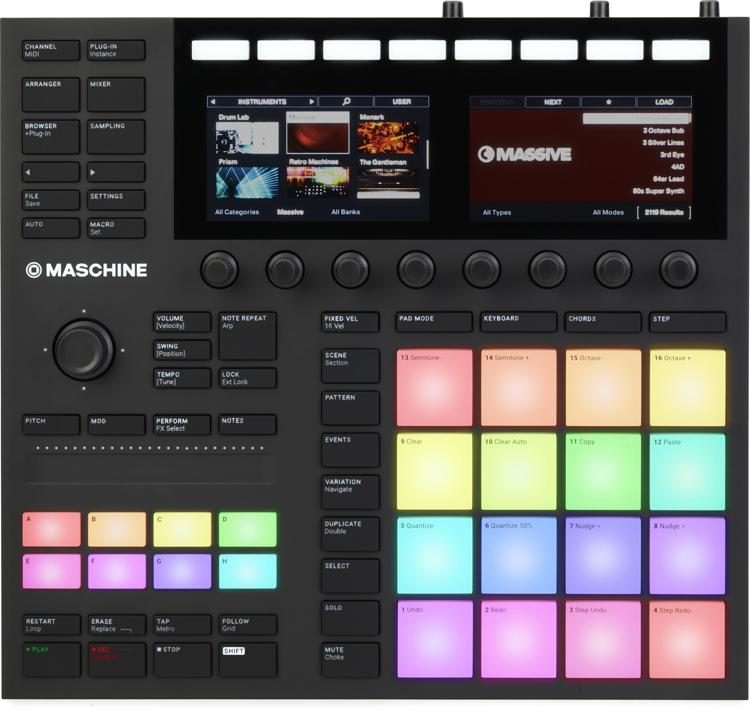
I remember the first time I loaded a kit on the Maschine and played into the pads properly. The pad response is genuinely exceptional, large, velocity-sensitive, with aftertouch, and responsive enough that finger drumming feels musical rather than mechanical. Coming from a real kit, that tactile feedback matters more than most people expect.

The sound library is in a different class from everything else on this list. Over 8GB of content is included straight after registration, more than 100 drum kits, over 700 individual drum sounds, and full access to Komplete 15 Select, which includes instruments from Massive, Monark, Prism, and Kontakt. You won’t run out of sounds.

The dual full-color screens are the feature that separates the MK3 from every other pad controller at this price. You can browse kits, sounds, effects, and plug-ins entirely from the hardware without touching a keyboard or mouse.

The built-in 24-bit/96kHz audio interface means you can record directly into your DAW without an external interface, and real owners consistently confirm the sound quality is clean with no driver issues on Mac or Windows.

DAW integration is seamless, VST, AU, and AAX inside Logic, Ableton, FL Studio, and Pro Tools. Native Instruments has built one of the deepest production ecosystems in the industry, and the MK3 is the hardware that ties it all together. This isn’t a machine you’ll outgrow.

One thing to know: the MK3 requires a computer to run, there is no standalone mode. Every session means opening a laptop.

If you want a machine you can use without a computer, the Roland TR-8S or Arturia DrumBrute are the better options on this list. The encoder knobs are also documented to loosen over time under heavy use, keep them dust-free.

Best for: Drummers getting into production, producers who want the deepest workflow and sound library, anyone planning to work inside a DAW.

Not ideal for: Standalone jamming without a computer, players who want a simple plug-and-play hardware experience.
Pros
What we love
Best pads on this list. Oversized, velocity-sensitive, with aftertouch. Multiple real owners describe finger drumming on these as genuinely musical — not just functional.
8GB+ of sounds out of the box. 100+ kits, 700+ drum sounds, and Komplete Select included. Nothing on this list comes close to the depth of content you get immediately after registering.
Built-in 24-bit/96kHz audio interface. Record straight from the MK3 without an external interface. Real owners confirm it sounds clean and works without driver headaches on Mac and Windows.
Dual full-color screens. Browse kits, sounds, effects, and plugins without ever touching your computer keyboard. The screens are the feature that separates MK3 from every other pad controller at this price.
Seamless DAW integration. Works as VST, AU, and AAX inside Logic, Ableton, FL Studio, and Pro Tools with zero compatibility issues reported by current owners.
All-metal construction. Touch-sensitive knobs, firm clicky buttons, and build quality benchmarked against the Ableton Push 2. Feels like a professional instrument, not a toy.
Cons
Watch out for
Requires a computer to run. No standalone mode on the MK3. Every session means opening a laptop. If you want to jam without a computer, consider the Maschine+ instead.
Real learning curve. Easy to make a beat in the first session. Easy to stay at a surface level for months. The depth of this platform rewards patience and deliberate study — casual users often under-use it.
Knobs loosen over time. Documented across the NI community — the encoders are the hardware's weak point. Resistance changes unevenly with heavy use. Keep them dust-free and avoid forcing them.
No tilt stand or back legs. The unit sits flat at all times. Not a dealbreaker for most, but worth noting if you prefer an angled playing surface for finger drumming.
Software updates have disappointed long-term users. The Maschine 3.0 update was widely criticized for adding little of substance. NI's pace of software development is a known frustration in the community.

2. Roland TR-8S Rhythm Performer

Best for Live
Roland TR-8S Rhythm Performer
Roland
TR-8S
4.6
#2 Best for Live
808. 909. 707. 727. 606. CR-78. All in one box, with faders for every voice and 128 patterns ready to fire. The TR-8S was literally built to play live — and it shows the second you put your hands on it.
Score Breakdown
9.1 / 10
Ease of Use
9/10
Dedicated fader and knobs per voice means your hands go straight to the right control. One of the most immediate drum machines to pick up and play on this list — no menus for basic operations.
Sound Library
10/10
ACB models of the 808, 909, 707, 727, 606, and CR-78 plus sample import via SD card. 128 kits with 8 variations each. The deepest classic TR sound library available in a single unit.
Pad Feel
8/10
16 velocity-sensitive trigger pads plus a dedicated live performance pad on the right side. Responsive and fun for tapping in beats. Not as expressive as MPC-style pads but perfectly suited to TR-style performance.
Build Quality
8/10
Sturdy enough for regular gigging despite a lighter plastic housing. Faders and knobs feel smooth and professional. Not built like a tank, but multiple owners confirm years of reliable live use.
DAW Integration
8/10
Multichannel USB audio with individual outs per track plus MIDI I/O. Some owners report MIDI timing issues as clock master in Ableton and Logic — use dedicated MIDI and audio connections for multitrack sessions.
Portability
9/10
Standalone operation — no computer required. Runs on AC adapter and fits easily in a backpack. The go-to choice for drummers and producers who need a self-contained performance rig.
Value
9/10
Six legendary Roland machines in one box with sample import and 6 assignable outputs. At this price point, no other standalone drum machine offers this breadth of vintage ACB sounds.
Beginner Friendly
9/10
Step sequencing with the classic TR layout is one of the most intuitive ways to learn beat-making. Owners consistently report getting a full pattern going within minutes of unboxing.
What's included / key specs
ACB Models: 808, 909, 707, 727, 606, CR-78 Sample Import via SD Card 128 Patterns / 8 Variations Each Per-Voice Faders + Knobs 6 Assignable Outputs Multichannel USB Audio Scatter FX + Motion Sequencing Trigger Out for Eurorack / CV Gear Standalone (No Computer Required) MIDI In / Out Aftertouch Pads Built-in Audio Interface (DAW recording)
Roland TR-8S Rhythm Performer

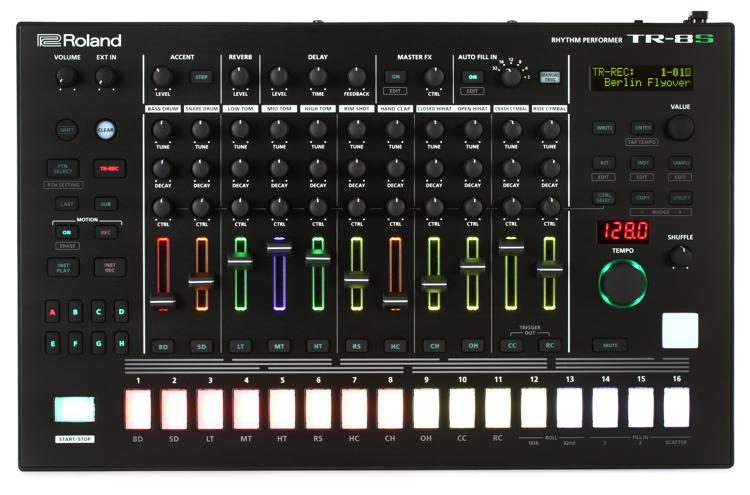
Roland has been making drum machines longer than most of us have been alive, and the TR-8S is the clearest expression of everything they’ve learned.

If you want to understand why the 808 and the 909 changed music, this is the machine that puts both of them in your hands, along with the 707, the 727, the 606, and the CR-78.

Every voice has its own dedicated level fader and control knobs, there are no menus to navigate for the parameters you actually reach for mid-performance. You push up a fader, turn a knob, hear the result immediately.

That real-time interaction is what makes this machine genuinely suited to live performance in a way that a laptop never quite replicates.

It’s also one of the strongest options we’ve covered in our guide to the best beat machines for hip-hop, the ACB-modeled 808 kick is the closest hardware equivalent to the original at this price.

The ACB sound engine doesn’t just sample the 808, it models the actual analog behavior of each circuit component, which means the sounds respond to parameter changes the way real analog hardware does.

Multiple Sweetwater owners describe the difference as immediately audible compared to sample-based TR emulations.

Sample import via SD card lets you replace up to 11 sounds per kit with your own WAV or AIFF files and combine them with the ACB sounds in a single kit. The TR-8S is also fully standalone, no computer needed. Power it up, load a pattern, and play.

One thing to know: The TR-8S has no triplet programming support, you cannot program true triplet patterns natively. For jazz, shuffle grooves, or certain hip-hop feels, this is a real limitation flagged consistently by MusicRadar and owner reviews.

When recording multiple tracks over USB into a DAW, tracks also sum to mono, use the six physical outputs for proper multitrack studio sessions.

Best for: Live performers, drummers who want classic TR sounds in a hardware box, producers who want standalone operation without a computer.

Not ideal for: Jazz or shuffle-focused work, studio producers who need deep multitrack USB recording.
Pros
What we love
Six legendary Roland machines in one box. ACB models of the 808, 909, 707, 727, 606, and CR-78 built in. Nothing else at this price puts this much classic TR DNA in your hands without hunting for vintage hardware.
Fully standalone — no computer needed. Power it up, load a pattern, and play. The TR-8S is a complete performance instrument without a laptop in sight. A genuine advantage over the Maschine MK3 for live use.
Dedicated fader and knobs per voice. Every track has its own level fader, pitch, decay, and assignable CTRL knob. Real-time tweaking feels natural and immediate — no menus needed for the controls you actually reach for on stage.
Sample import via SD card. Replace up to 11 sounds per kit with your own WAV or AIFF files. Combine ACB tones with custom samples in a single kit — a level of hybrid flexibility owners consistently highlight as a standout feature.
Six assignable outputs. Route individual drums to separate channels for mixing, sidechain compression, or parallel processing. One of the few drum machines at this price with this level of studio routing flexibility.
Scatter FX and Motion Sequencing. Automate any parameter on the fly during live performance. Sweetwater owners consistently describe the Motion Record feature as the most creatively addictive thing about the TR-8S.
Cons
Watch out for
No triplet programming. Documented limitation across multiple owner and professional reviews — you cannot program true triplet patterns (3 notes over 2 beats) natively. A real gap for jazz, shuffle, and hip-hop drummers.
Multitrack USB audio sums to mono. When recording individual tracks into a DAW over USB, tracks are summed to mono rather than recorded in stereo. Confirmed by multiple Sweetwater owners — use the 6 physical outputs for proper multitrack studio sessions.
SD card saves in proprietary format. Patterns cannot be exported as MIDI files. If you want to move sequences into a DAW for further editing, you'll need to record audio — there is no MIDI pattern export path.
Manual is genuinely poor. Multiple professional reviewers and real owners flag this — the manual covers the basics but leaves many features unexplained. Expect to spend time on YouTube to unlock the deeper functionality.
Less versatile for studio production. Designed for live performance first. Owners who primarily work in the studio report the TR-8S can feel limiting compared to software alternatives once the honeymoon period wears off.

3. Arturia DrumBrute Analog Drum Machine

Best Analog Sound
Arturia DrumBrute Analog Drum Machine
Arturia
DrumBrute
4.4
#3 Best Analog Sound
17 voices. 100% analog. 12 individual outputs. A Steiner-Parker filter across the master bus. The DrumBrute doesn't emulate classic drum machines — it builds its own sound from the ground up, and it hits harder than anything else at this price.
Score Breakdown
8.8 / 10
Ease of Use
8/10
Step sequencing is immediately intuitive — most owners report building a pattern within minutes. The deeper polyrhythm and song mode features take more time but reward the effort.
Sound Library
8/10
17 purely analog voices with its own character — not a TR clone. Two kicks, snare, clap, hats, toms, cymbals, zap, and more. Limited by fixed timbres but every sound is genuinely usable.
Pad Feel
7/10
Velocity-sensitive rubber pads are firm and satisfying. MusicTech notes this is a step-sequencer first, not an MPC-style finger drumming workstation. Pads are functional, not expressive.
Build Quality
9/10
Substantial, well-built chassis with faux-wood side panels. Multiple reviewers highlight the weight and solidity as surprising for the price. Knobs and pads hold up under regular live use.
DAW Integration
7/10
MIDI, USB, and Clock sync covered. Patterns cannot be exported as MIDI. Sound parameters cannot be recorded or automated over DAW — what you set on the panel is what you get.
Portability
8/10
Fully standalone with no computer required. AC-powered with a solid form factor that travels well. AudioTechnology reviewers describe it as a natural live performance instrument.
Value
10/10
17 fully analog voices, 12 individual outputs, a Steiner-Parker filter, polyrhythm sequencing, song mode, and MIDI/DIN/USB sync — all at a price that leaves most competitors looking thin.
Beginner Friendly
9/10
No menus, no screens, no layers. Every parameter is on the surface. Multiple first-time drum machine owners report this as one of the easiest to understand layouts they've encountered.
What's included / key specs
17 Pure Analog Voices 12 Individual Outputs Dual-Mode Steiner-Parker Filter 64 Patterns / Up to 64 Steps Each Song Mode Polyrhythm Sequencing Per-Track Randomness Control Step Repeat / Looper MIDI / USB / DIN Sync / Clock Standalone (No Computer Required) Sample Import Parameter Automation / Motion Recording MIDI Pattern Export
Arturia DrumBrute
The Arturia DrumBrute is the machine I point people toward when they want the real thing, purely analog circuitry, no samples, no digital shortcuts, at a price that doesn’t require a second mortgage.

17 voices. 12 individual outputs.

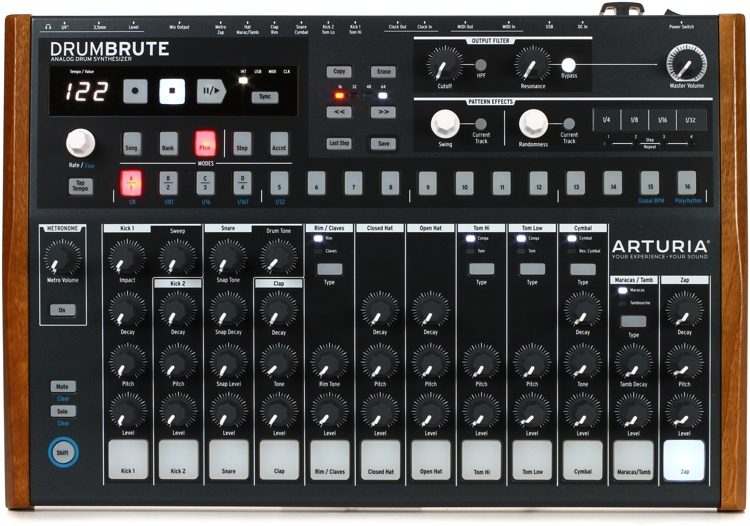
A Steiner-Parker master filter. Polyrhythm sequencing, where each track can run at an independent step length. Song mode. All fully analog. Gearspace reviewers who’ve owned analog machines at two or three times the price describe the DrumBrute as one of the most credibly spec’d machines at this price point.

The no-menus, no-screens layout makes it one of the most beginner-friendly designs on this list, every parameter is within direct reach on the panel.

The polyrhythm capability is what separates the DrumBrute from most machines here. Standard step sequencers lock every track to the same step length.

The DrumBrute lets each track run at its own independent length, creating evolving, interlocking patterns that are impossible to replicate on a standard sequencer.

If you want to dig deeper into how this works in practice, our guide on how to play polyrhythms as a drummer covers the concept thoroughly, and our drum machine pattern programming guide walks through the practical workflow step by step.

The 12 individual outputs at this price deserve special attention. Most machines at this level give you a single stereo mix.

Having 12 individual outs means routing the kick to its own channel for sidechain compression, processing the snare independently, running hats through a separate effect chain, studio flexibility you’d normally pay significantly more to access.

One thing to know: Knob positions are not saved with patterns. When you recall a saved pattern, the sound reflects where the physical knobs currently sit, not where they were when you programmed it.

Also, the 12 individual outputs use 3.5mm mini-jack connectors, not standard quarter-inch. Budget for 3.5mm-to-TS adapter cables before your first studio session.

Best for: Producers who want 100% analog sound, anyone interested in polyrhythm and evolving patterns, studio use with individual output routing.

Not ideal for: Hybrid analog-plus-sample workflows, producers who need parameter automation or motion recording.
Pros
What we love
100% analog — no samples, no shortcuts. Every one of the 17 voices is generated by pure analog circuitry. Gearspace owners consistently describe the sound as having a weight and character that no plugin has fully replicated.
12 individual outputs at this price is remarkable. Route every voice to its own channel for processing, sidechain, and parallel compression. MusicRadar calls this the kind of studio routing flexibility you'd normally pay significantly more to get.
Polyrhythm sequencing built in. Each track can run at an independent step length, creating evolving, interlocking rhythms that are impossible to replicate with a standard step sequencer. AudioTechnology reviewers described this as one of the most creatively addictive features at this price point.
Steiner-Parker master filter. The same dual-mode filter used in Arturia's MiniBrute — a genuine analog filter across the master output. No other drum machine at this price includes a filter of this pedigree.
Everything is on the surface. No menus, no hidden screens, no layers. Sound On Sound notes that any parameter you can hear is within direct reach. First-time drum machine owners consistently report getting a working pattern going within minutes.
Exceptional value for a fully analog machine. Gearspace reviewers repeatedly describe the DrumBrute as "incredulously good value" — 17 analog voices, song mode, polyrhythms, 12 outs, and a filter at a price that undercuts most analog competitors significantly.
Cons
Watch out for
Knob positions aren't saved with patterns. AudioTechnology flags this clearly — when you recall a saved pattern, the sound is determined by where the physical knobs currently sit, not where they were when you saved it. What sounded perfect yesterday may sound completely different today.
Kick 1 and the snare have a narrow sweet spot. Documented consistently across Gearspace, zZounds, and Gemtracks reviews — the first kick voice in particular takes patience to dial in. Sending it through its own individual output for external processing helps considerably.
No parameter automation or motion recording. MusicRadar confirms you cannot record or automate knob movements — what you set on the panel is what plays back. Real-time tweaking only. A known limitation that disappoints studio-focused users.
No sample import. The DrumBrute is purely analog — you cannot load your own sounds. If you need hybrid analog-plus-sample workflow, the Roland TR-8S is the better fit for this list.
Individual outputs are 3.5mm mini-jacks. The 12 individual outs use 3.5mm connectors rather than standard quarter-inch. You'll need a set of 3.5mm-to-TS adapter cables to connect to a standard mixer or interface — not included and an easy thing to overlook before your first session.

4. Korg Volca Beats Analog Drum Machine

Best Budget Analog
Korg Volca Beats Analog Drum Machine
Korg
Volca Beats
4.2
#4 Best Budget Analog
Analog kick, snare, toms, and hats. Built-in speaker. Battery powered. Smaller than a paperback book. The Volca Beats is the entry point that's turned more people into drum machine obsessives than any other unit at this price — and the hats alone are worth it.
Score Breakdown
8.1 / 10
Ease of Use
9/10
One knob per function across six analog parts. No menus, no screens. MusicRadar calls the sequencer tight and accessible — most first-time users have a beat running within minutes of unboxing.
Sound Library
7/10
6 analog voices plus 4 PCM parts — kick, snare, toms, hats, clap, claves, agogo, crash. The hats are genuinely excellent. The snare is the weakest link and a consistent owner complaint at every skill level.
Pad Feel
6/10
Touch-sensitive rubber keys rather than velocity-sensitive pads. They work but take adjustment — multiple Sweetwater owners flag the small size as a challenge. Not designed for expressive finger drumming.
Build Quality
7/10
Compact but surprisingly sturdy for the price. The plastic chassis shows wear over time. Knobs are smooth and reliable. Designed for portability and light regular use, not heavy touring.
DAW Integration
6/10
MIDI In only — no MIDI Out. Sync In/Out for Volca ecosystem chaining. Can be sequenced from a DAW but cannot send patterns back. A real limitation for anyone wanting full DAW integration.
Portability
10/10
Built-in speaker, 6 AA battery power, and a footprint smaller than a paperback. Nothing on this list is more portable. Owners describe using it on planes, buses, and hotel rooms without a second thought.
Value
10/10
Analog drum machine with a built-in speaker, battery power, Stutter and Step Jump functions, and Sync I/O at a price that is hard to argue with. MusicRadar called it a new benchmark for sound and features at this price point.
Beginner Friendly
9/10
The most beginner-accessible analog drum machine on this list. Minimal parameters, tactile layout, no power adapter needed to get started. Amazon owners consistently describe it as the perfect first hardware drum machine.
What's included / key specs
6 Analog Voices 4 PCM Voices Built-in Speaker Battery Powered (6x AA) 16-Step Electribe-Style Sequencer 8 Pattern Memory Slots Stutter + Step Jump Functions Sync In / Out (Volca Ecosystem) MIDI In Standalone (No Computer Required) MIDI Out Individual Outputs Swing Control Pattern Chaining Power Adapter Included
Korg Volca Beats

The Volca Beats is the machine that gets more people into drum machines than anything else on this list. I’ve met producers with full studio rigs who still keep one on the desk because they grabbed it as a cheap starting point years ago and never got rid of it. That’s not an accident.

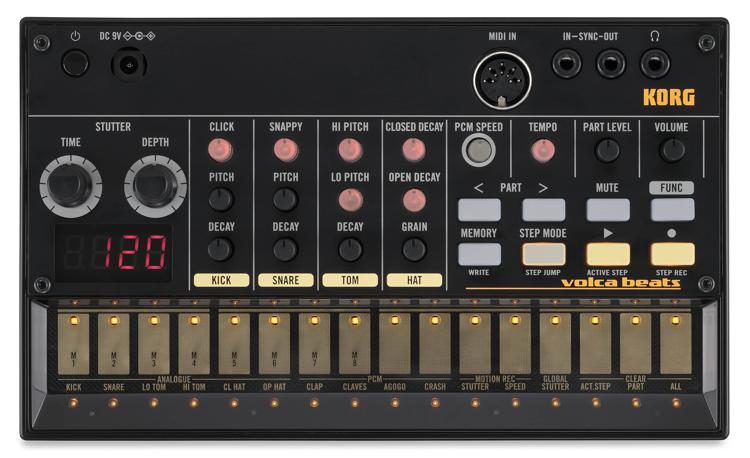
Six analog voices, four PCM voices, a 16-step Electribe-style sequencer, motion recording, a stutter effect, and a built-in speaker. Battery powered.

If you’ve never owned a drum machine before and you want to understand how step sequencing works with your hands on real hardware, this is genuinely the best starting point available.

If you’re looking for something to pair with an electronic drum pad setup, the Volca’s Sync I/O makes it easy to clock alongside other gear.

The kick and low toms punch above their price. MusicRadar called the low end satisfyingly substantial for what the Volca Beats costs, and multiple Sweetwater owners back this up, the analog low end sits into a mix without heavy EQ in a way that most digital samples at this price point don’t.

The stutter effect turns a static loop into something performance-worthy fast, and the Volca ecosystem Sync I/O means you can chain a Volca Bass, Volca Keys, and Volca Beats into a complete analog rig with zero setup overhead.

One thing to know: The snare is the weakest voice on the machine, the most consistent complaint across Sweetwater, Gearspace, Thomann, and the Korg forums. Most owners run it through a compressor or layer it with an external sample when working seriously.

There is no swing control on the unit itself (the SyncKontrol iOS app unlocks it as a workaround), and there is no MIDI Out, so patterns live on the unit only.

Best for: First-time drum machine buyers, producers on a tight budget, anyone who wants truly portable analog beats with battery power and a built-in speaker.

Not ideal for: Studio use where individual output routing matters, jazz or shuffle-focused work, setups that need MIDI Out.
Pros
What we love
The most portable drum machine on this list. Battery powered, built-in speaker, and smaller than a paperback. Consordini reviewers describe using it on planes and buses without a second thought. Nothing else on this list gets you making beats without a power outlet.
Kick and toms that punch above their price. Multiple Sweetwater and Gearspace owners consistently rank the kick and low toms as highlights — fat, analog, and sitting into a mix without heavy EQ. MusicRadar called the low end satisfyingly beefy for what it costs.
One knob per function — no menus, no diving. Every parameter is physically on the surface. Sweetwater owners describe getting a usable groove going within minutes of unboxing. The Electribe-style sequencer is one of the most intuitive layouts in this price range.
Stutter effect is genuinely creative. Real-time stutter with adjustable time and depth turns a basic pattern into something performance-worthy fast. Owners across Gearspace and the Korg forums describe it as one of the most addictive features on any compact drum machine.
Volca ecosystem sync out of the box. Sync In/Out means you can chain multiple Volcas — Bass, Keys, Drum — into a complete analog rig with zero setup overhead. The entry point that tends to become three units on a desk within a year.
The best bang-for-buck analog drum machine available. Kick, snare, toms, hats, clap, clave, agogo, and crash with a step sequencer, motion recording, stutter, and battery power — at a price that every professional review describes as hard to argue with for a first hardware drum machine.
Cons
Watch out for
The snare is the weakest voice on the machine. The single most documented complaint across Sweetwater, Gearspace, Thomann, and the Korg forums. Multiple owners describe it as tinny and difficult to dial in. Layering it with an external sample or running it through a compressor helps — but you'll likely need to.
No MIDI Out. You can receive MIDI from a DAW or controller but cannot send pattern data back out. Confirmed by MusicRadar and multiple Korg forum owners — sequences live on the unit only. No way to extract a pattern as MIDI and continue working in your DAW.
No swing control on the unit itself. Sound On Sound and MusicRadar both flag this — the Volca Beats has no built-in swing parameter. You can access swing through Korg's SyncKontrol iOS app via the Sync port, but it's a workaround, not a solution, and not available on every setup.
Single stereo output only. No individual outs, no panning per voice. Everything sums to one stereo mix. Gearspace and Thomann owners consistently flag this as the most limiting factor for anyone wanting to process drums separately in a studio context.
Power adapter not included. Runs on 6 AA batteries which last around 10 hours — budget for a dedicated 9V adapter (Korg KA-350) before your first studio session. Small omission, easy to overlook, genuinely annoying the first time your batteries die mid-session.

5. Alesis SR-16 Portable Electronic Drum Machine

Best for Practice
Alesis SR-16 Portable Electronic Drum Machine
Alesis
SR-16
4.1
#5 Best for Practice
In production since 1990 for a reason. 233 sounds recorded from real drums, 50 patterns played in by real studio drummers, Dynamic Articulation, full MIDI I/O, and dual footswitch inputs — all in a box smaller than a hardcover book. The drummer's drum machine.
Score Breakdown
7.9 / 10
Ease of Use
8/10
50 ready-to-use patterns played by real studio drummers mean you're up and running immediately. Programming custom beats takes some menu diving but the logic is consistent and learnable in a single session.
Sound Library
8/10
233 sounds sampled from real drums and offered both dry and with built-in reverb. Dynamic Articulation changes tone based on velocity — a feature that still holds up 30 years later. Some sounds date themselves to the early 90s.
Pad Feel
6/10
12 velocity-sensitive pads that are small and closely spaced. DrumHelper and multiple Sweetwater owners consistently flag the pad size as a limitation for finger drumming. They work — they just require adjustment coming from larger pads.
Build Quality
8/10
Built to last — Alesis has made this machine essentially unchanged since 1990 and units from the early 2000s are still in regular use. Compact, sturdy, and road-proven by decades of working musicians.
DAW Integration
8/10
Full MIDI In/Out/Thru covered. Can be sequenced from a DAW or used as a MIDI sound module triggering external gear. Some owners report a minor noise floor when recording audio out — use it as a MIDI module into a DAW sampler to bypass this.
Portability
9/10
2.5 lbs, 9.25" wide, power supply included. Fits in a laptop bag. Dual footswitch inputs mean it works hands-free on stage. One of the most genuinely portable full-featured drum machines ever built.
Value
9/10
233 sounds, 50 pro-played presets, full MIDI I/O, dual footswitch inputs, Dynamic Articulation, and 4 outputs at a price that hasn't changed meaningfully in decades. Outstanding value for working musicians and practice drummers alike.
Beginner Friendly
8/10
50 pro-played presets with A/B variations and fills mean there's immediately useful content with zero programming. Custom pattern editing requires menu navigation — manageable with the manual but not as instant as the Volca Beats.
What's included / key specs
233 Sounds / 24-bit Sound Engine 50 Preset Patterns (Pro-Played) 50 User Pattern Slots A/B Variations + 2 Fill Sections Per Pattern Dynamic Articulation Full MIDI In / Out / Thru Dual Footswitch Inputs 4 Outputs (L/R + Aux + Headphones) Power Supply Included Standalone (No Computer Required) Analog Sound Engine Built-in Speaker Backlit Display Sample Import
Alesis SR-16

The Alesis SR-16 has been in continuous production since 1990.

Equipment that sticks around for 35 years does so because working musicians keep buying it, and the SR-16 is still here because gigging drummers and practice-focused players keep finding it useful in ways that newer machines don’t replace.

This is a drummer’s drum machine, not a producer’s drum machine. The 50 preset patterns weren’t programmed with a mouse, they were played in by real studio drummers.

Each pattern comes with A and B variations and two fills, giving you enough structure to build an entire song arrangement without touching the programming interface.

The Dynamic Articulation system changes tone and timbre based on velocity, Alesis pioneered this in 1990 and many budget machines still don’t do it convincingly.

The dual footswitch inputs are the feature that keeps gigging drummers coming back. Assign start/stop and A/B pattern changes to footswitches and you have a complete one-person performance rig where your hands never leave your instrument.

Full MIDI In/Out/Thru means it also works as a sound module triggered by a DAW or external pad controller, if you want to understand how to set that up, our guide on how to program MIDI drums covers the workflow clearly.

For guitarists who want a compact backing solution, the SR-16 is also our top pick in the best drum machines for guitarists guide.

One thing to know: The display has never had a backlight in 35 years of production. On a dim stage or in a dark studio, reading the screen is genuinely difficult, this is the single most consistent complaint across Sweetwater, zZounds, Audiofanzine, and Equipboard, and Alesis has never corrected it. You also cannot program automatic tempo changes within a song.

Best for: Gigging drummers who need a reliable backing track, solo performers who want footswitch control, practice use, anyone who values decades-proven reliability over modern features.

Not ideal for: Studio production as a primary beat source, dark stage performances where you need to read the display.
Pros
What we love
Still in production since 1990 for a reason. Multiple Sweetwater owners report using their SR-16 for 20 to 30 years without a single failure. Gearspace and zZounds reviewers consistently describe units from the early 2000s still performing flawlessly today. That kind of reliability is genuinely rare at any price.
50 patterns played by real studio drummers. Not programmed beats — played in by human drummers. Sweetwater owners describe being immediately surprised at how musical the presets feel compared to other machines at this price. A/B variations and two fills per pattern give you song arrangement flexibility out of the box.
Dynamic Articulation still holds up. Tone and timbre change based on velocity — a feature Alesis pioneered in 1990 that many modern budget machines still don't do convincingly. Equipboard reviewers describe the drum sounds as performing more realistically under live playing than most competitors at double the price.
Dual footswitch inputs for hands-free live use. Assign start/stop and A/B/fill changes to footswitches and you have a complete one-person performance rig. Multiple Sweetwater reviewers with 30+ years of gigging experience describe this as the feature that keeps them coming back to the SR-16 over newer machines.
Full MIDI In/Out/Thru. Use it as a sound module triggered by a DAW, an electronic kit, or a pad controller. zZounds owners describe the MIDI implementation as the most complete they've used at this price — sequence from Ableton and trigger the SR-16 sounds for a hybrid digital-acoustic result.
Outstanding manual. zZounds reviewers specifically call out the documentation as exceptional — explains quantization, panning, and time signatures clearly enough for complete beginners. A rare pro for hardware in this category where manuals are often an afterthought.
Cons
Watch out for
No backlit display. The most consistent complaint across Sweetwater, zZounds, Audiofanzine, and Equipboard. On a dim stage or in a dark studio the screen is difficult to read. A 1990 design decision that Alesis has never corrected across 35 years of production.
Pads are small and closely spaced. Equipboard and multiple Sweetwater owners flag this clearly — the 12 pads are functional but tight. Coming from a larger pad controller or an electronic kit, the adjustment takes time. Not a machine you'll want to use for expressive finger drumming.
Samples are harder to mix than analog. A Gearspace studio owner review flags this specifically — the 24-bit samples take up more mixing headroom than expected and can feel dense in a full arrangement. Works best as a live performance or practice tool rather than a primary studio production source.
Tempo cannot change within a song automatically. Audiofanzine owners document this as a real limitation for live use — you cannot program tempo changes inside a song. Manual adjustment or footswitch workarounds are the only options, and neither is seamless mid-performance.
Some sounds show their age. The SR-16 was recorded in 1990 and a handful of sounds — particularly certain cymbals and claps — are immediately recognisable as products of that era. Most sounds hold up well, but producers working in modern genres may find themselves reaching for processing quickly on specific voices.

What Makes a Great Drum Machine for Beginners?

After two decades of playing drums and working with these machines, I’d narrow the criteria down to three things that actually matter.

The first is immediacy. The best drum machines for beginners let you make something that sounds good quickly, not eventually, not after you read the manual.

If you sit down with a machine for the first time and can’t get a usable groove going within twenty minutes, that’s a design failure, not a learning gap. Every machine on this list passes that test.

The second is sound quality. There are drum machines that sound like drums and drum machines that sound like a MIDI file from 2003. The difference is audible in a mix.

Analog voices, real drum samples, or ACB-modeled circuitry, all three approaches on this list produce sounds that hold up in a real production context.

The third is workflow depth. A machine that’s simple enough to learn in an afternoon but deep enough to still reveal new things a year later is the one worth buying. The Volca Beats and SR-16 sit at the simple end of that spectrum.

The Maschine MK3 and TR-8S sit at the deep end. Where you want to be depends entirely on what you plan to do with it.

Things to Consider When Buying a Drum Machine


Do you need standalone operation? The Maschine MK3 requires a computer to function. Every other machine on this list works completely on its own.

If you want to make beats without opening a laptop, the Roland TR-8S, Arturia DrumBrute, Korg Volca Beats, and Alesis SR-16 are all standalone instruments.

Analog or digital? Analog machines, the DrumBrute and Volca Beats, generate sounds through real hardware circuits. The result is a warmth and physical character that digital samples replicate convincingly but never identically.

If raw analog texture matters to your music, go analog. If workflow and sound library depth matter more, the Maschine MK3 or TR-8S will serve you better.

Drum machine vs. drum pad controller: A drum machine is a standalone instrument with its own sounds, sequencer, and output. A pad controller is a MIDI device that triggers sounds in a connected computer, it produces nothing on its own.

If you want to make music without a computer involved, you want a drum machine, not a pad controller. Our guide to the best electronic drum pads covers pad controllers for anyone who needs that side of the equation.

How important is portability? The Korg Volca Beats runs on batteries, has a built-in speaker, and fits in a jacket pocket. The Arturia DrumBrute weighs several pounds and needs a power outlet.

If you want to make beats in places without power, the Volca is the only machine on this list designed for that.

What genre are you working in? For hip-hop production, the TR-8S with its ACB 808 model is the standout choice. For electronic music and live performance, the TR-8S and DrumBrute both excel.

For rock and practice use, the SR-16’s drummer-played presets are hard to beat. For serious production across any genre, the Maschine MK3 is the most complete platform.

FAQ

What is the easiest drum machine to use?

The Korg Volca Beats is the easiest drum machine for beginners to pick up immediately. One knob per function, no menus, no screens, and a step sequencer that most people understand within minutes.

That simplicity is why it’s been the entry point for more people into drum machines than anything else at this price.

Which drum machine is best for beginners?

The Native Instruments Maschine MK3 is the best drum machine for beginners who are serious about production, deepest sound library, best pads, built-in audio interface, and seamless DAW integration.

For the easiest starting point at the lowest price, the Korg Volca Beats. For the best live performance capability without a computer, the Roland TR-8S.

Is a drum machine worth it for a drummer?

Yes, if you’re interested in production or beat-making. A drum machine is a composition tool, not a performance technique tool, it works completely differently from a kit. For drummers who want to improve their playing rather than explore production, a metronome or electronic drum set will serve you better.

What is the most popular drum machine?

Among current machines, the Roland TR-8S has the strongest reputation among live performers and producers. The Maschine MK3 is arguably the most widely used in serious production contexts.

Historically, the Roland TR-808 and TR-909 remain the most influential drum machines ever made, the TR-8S is the closest modern equivalent to both in a single unit.

Can a drum machine replace a drummer?

For studio production, live electronic performance, and backing track use, yes. For a live band context where the energy of a human drummer is part of the music, no.

Drum machines and drummers solve different problems. Knowing which problem you’re trying to solve is the most important question to answer before buying.

Analog vs. digital drum machines – which is better for beginners?

Neither is better, they’re different tools. Analog machines like the DrumBrute and Volca Beats have warmth and a hands-on layout that many beginners find intuitive.

Digital machines like the Maschine MK3 and TR-8S offer deeper sound libraries, more sophisticated sequencing, and better DAW integration. If you’re starting from scratch and unsure, the Korg Volca Beats gives you a genuine analog experience at a price that makes it an easy first commitment.

Conclusion

A drum machine isn’t a replacement for a drum kit, it’s a completely different instrument that rewards a different kind of creativity.

The most productive moments I’ve had with any of these machines have come from the same place as the best moments behind a kit: showing up, experimenting, and following whatever sounds interesting.

If you want my single recommendation: the Native Instruments Maschine MK3 is the best overall investment for beginners who are serious about production.

The sound library is unmatched, the pads are the best on this list, and the platform grows with you in a way none of the other machines here can match.

If budget is the constraint: start with the Korg Volca Beats. It’s the machine that’s turned more people into drum machine obsessives than anything else at this price. Once it clicks, you’ll understand why it’s still selling more than a decade after it launched.

Whatever you choose, plug it in, press play, and make something. That’s the only way any of these machines actually teach you anything.

Brett Clur has a Drum Performance Diploma from Trinity College London  has been playing drums for over 20 years. He is passionate about advanced concepts and uses his years of experience to teach his students about them. While he is a full-time drum teacher, he is also working on growing a YouTube channel where shares his insights. You can see him playing there, or on Instagram where he posts daily videos.

Pin It on Pinterest

Share This

Wait! Download Our Free eBook Now!

free-drum-sheet-music

Wait! Download Our Free eBook Now!

Enter your name and email below to get instant access to our FREE eBook, “9 Powerful Tips To Get Faster On The Drums (And The Mistakes To Avoid!)”

Where Do We Send Instant Access?

free-drum-sheet-music

Where Do We Send Instant Access?

Enter your name and email below to get instant access to our FREE eBook,
“9 Powerful Tips To Get Faster On The Drums (And The Mistakes To Avoid!)”